Your network, visible
at a glance
Automatic inventory, real-time mapping and configuration history. No more outdated documentation, instantly find any device by IP or MAC.
Complete inventory
Multi-vendor automatic discovery
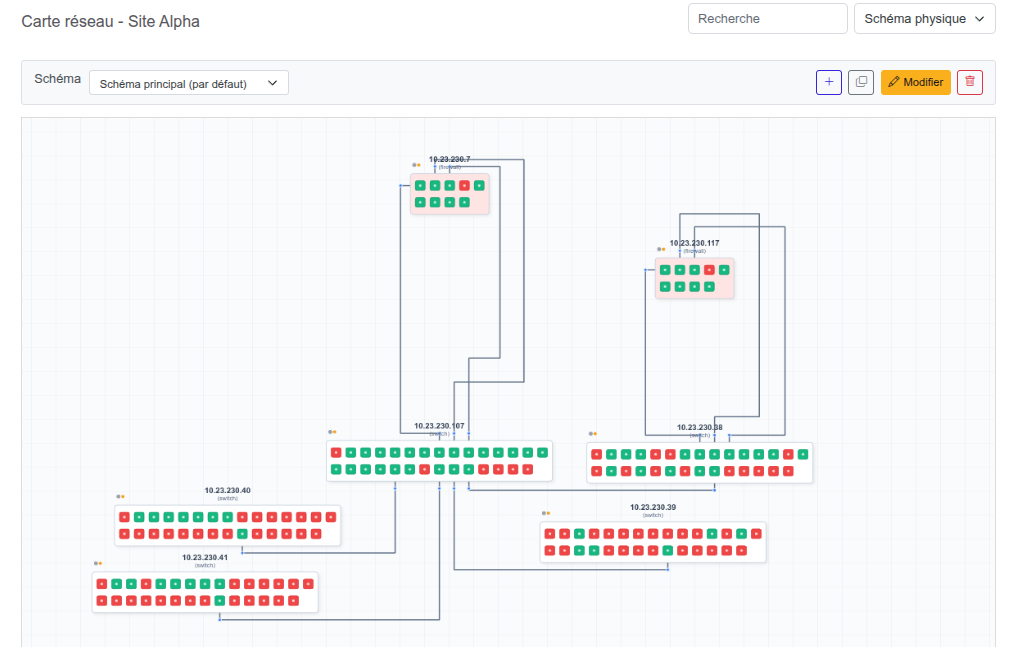
Real-time mapping
Automatic LLDP topology
Instant localization
Find by IP, MAC or name
Full history
Configuration versioning
Daily challenges for network teams
Managing a modern network infrastructure means juggling dozens of devices from different vendors, spread across multiple sites. Traditional tools can no longer keep up.
-
Documentation always outdated
Excel diagrams and manual inventories are outdated after the next change. Your teams work with stale data.
-
Multi-vendor = multiple interfaces
Cisco, Huawei, Fortinet, Aruba: each vendor has its own syntax and tools. No consolidated view.
-
Locating a workstation takes too long
Identifying where a device is connected requires manually checking ARP tables on multiple devices sequentially.
-
Changes without traceability
A configuration change can break the network. Without history or diff, identifying the cause of an incident becomes a headache.
Sound familiar?
Intelligent Networks solves these.
Dynamic multi-vendor inventory
Intelligent Networks automatically discovers and inventories all devices on your network, regardless of vendor or type. Switches, routers, firewalls, Wi-Fi access points, servers: each element is identified, cataloged and continuously updated.
For each device, the solution automatically collects:
- Model, firmware, serial number
- Interfaces and operational status
- IP and MAC addresses
- VLANs and subnets
- Routing tables (static, OSPF, BGP…)
- ARP tables and LLDP/CDP neighbors
- Complete configuration
- Uptime
Supported vendors
IOS / NX-OS / IOS-XE
AOS-CX / AOS-S
Comware / ProCurve
EOS
Junos
VRP
EXOS
FortiOS
RouterOS
OmniSwitch
PAN-OS
Servers / Firewalls
Automatic and interactive network diagram
From collected data (LLDP, ARP), Intelligent Networks automatically generates a network diagram reflecting the real topology of your infrastructure. This diagram updates dynamically, ensuring mapping always faithful to the current network state.
It's not just a visual representation: it's a real working tool.
-
Details in one click
Click on a device to instantly view its information: interfaces, VLANs, status, configuration.
-
Real-time link status
View the operational status of each link and interface directly on the diagram.
-
Direct administration
Open an SSH, RDP or Web administration session on the selected device without leaving the diagram.
This approach eliminates back-and-forth between different tools and speeds up diagnostics during incidents.
Global ARP table and device localization
Locating a workstation, server or device on the network is often a tedious task that requires checking multiple devices sequentially. Intelligent Networks solves this by consolidating all network ARP tables into a single, searchable view.
By entering an IP or MAC address, instantly get:
The connected device
The physical port used
The associated VLAN
Connection history
Typical use cases
-
Incident diagnostics
Instantly find where the problematic device is connected.
-
Intrusion detection
Identify unauthorized machines on your network.
-
Movement tracking
Track workstation movements through position history.
Traceability cycle
Change detection
Automatic identification of any change
Timestamped archive
Timestamped save of the new configuration
Visual diff
Comparison between old and new version
Configuration change management
Any configuration change on a network device can have significant consequences on infrastructure availability and security. Intelligent Networks maintains a complete configuration history for each device and automatically detects any change.
This traceability addresses 4 essential needs:
-
Incident diagnostics
Quickly identify if a recent change caused a malfunction.
-
Security audit
Verify that configurations comply with defined security policies.
-
Regulatory compliance
Have a documented change history for compliance audits.
-
Rollback
Restore a previous configuration if needed, in one click.
Vision 360: what is actually exposed on your network
Every inventoried device is also analyzed on the service side. Vision 360 consolidates, across your entire fleet, the services discovered on the network: a cross-cutting view that neither an inventory nor a one-off scan provides.
Web services
Detection of HTTP and HTTPS services, on standard and alternative ports.
SSL certificates
Issuer, validity, SAN — spotting expired, soon-to-expire or self-signed certificates.
SMB shares
Server name, OS, share list — highlighting publicly accessible shares.
Mail services
Detection of SMTP, IMAP and POP servers present on the network.
Open ports
Complete inventory of open ports per device, with service banner.
The security angle: spot at a glance a forgotten public share, a self-signed certificate or a service that should not be exposed.
Why choose Intelligent Networks?
Network management feature comparison
| Feature | Intelligent Networks | Open Source Solutions | Enterprise Solutions |
|---|---|---|---|
| Native multi-vendor inventory | Plugins | ||
| Automatic LLDP mapping | Limited | ||
| Interactive network diagram | Basic topology | ||
| Consolidated global ARP table | Partial | ||
| IP/MAC localization | Partial | ||
| Configuration versioning | Limited | ||
| Visual configuration diff | Basic | ||
| VPN-free access (via probes) | |||
| French support | Option | ||
| On-premise deployment | Depends on plan |
Concrete use cases
How our clients use the Network Management module daily
Infrastructure takeover
Taking over a poorly documented or inherited network? In a few hours, get the complete inventory, topology and all configurations. No more weeks of manual auditing.
Datacenter migration
Identify every dependency and connection before moving a single cable. Automatic mapping gives you an exact view of what is connected where and how traffic flows.
Compliance audit
Complete configuration history, traceability of each timestamped change: you are audit-ready. Export the necessary data in a few clicks.
Incident diagnostics
A change broke the network? Compare the current configuration with the previous version, identify the problematic change in seconds and restore if needed.
Workstation localization
Where is the problematic PC connected? Instant search by IP or MAC address across all network ARP tables, with complete position history.
Continuous documentation
No more outdated Excel diagrams after each change. Your network documentation is always automatically up to date: inventory, topology, configurations, VLANs.
Ready to take control of your network?
Inventory, mapping, localization and configuration traceability in one platform