A network expert available
24/7
Ask your questions in natural language, get instant diagnostics. The AI analyzes your infrastructure, identifies problems and proposes solutions.
Natural language
Ask your questions like talking to an expert
Full context
Inventory, configs, topology, metrics
On-premise
Your data never leaves your infrastructure
Multi-domain
Diagnostics, audit, planning
When human expertise is no longer enough
Network teams face growing complexity: more devices, more vendors, more sites. Diagnostics, auditing and planning still rely heavily on the individual experience of a few experts. This dependency creates bottlenecks and risks.
-
Time-consuming manual diagnostics
Manually cross-referencing logs, configurations, topology and metrics to identify the cause of an incident can take hours. Information is scattered across multiple tools.
-
Expertise concentrated in few people
Only 2 or 3 senior engineers truly know the network. When they are away or leave, the team loses critical expertise that is documented nowhere.
-
Documentation never up to date
Nobody documents after a change. Procedures exist but no longer reflect reality. New team members have no reliable basis to ramp up.
-
Risky changes with no visibility
Impact analysis is done from memory. Generating the right commands for each vendor takes time. Without a prepared rollback plan, every change is a risk.
Sound familiar?
Intelligent Networks solves these.
AI Assistant with full infrastructure context
Intelligent Networks integrates an AI assistant that goes beyond answering generic questions. Through tool calling, the AI directly accesses your infrastructure data: equipment inventory, active configurations, ARP tables, LLDP topology and monitoring metrics. Every answer is based on real data, not assumptions.
It's not a chatbot: it's an expert with full context of your network.
- Natural language dialog
- Inventory and configuration search
- Error and anomaly explanation
- 60+ internal tools: inventory, monitoring, syslog, diagrams…
- Contextual resolution suggestions
- Automatic diagnostic documentation
Dialog example
""Why does the SW-CORE-01 switch have CRC errors on Gi0/24?""
I analyzed the metrics and configuration of SW-CORE-01:
- Interface Gi0/24: 847 CRC errors/24h
- Probable cause: duplex mismatch
- Recommendation: force full-duplex
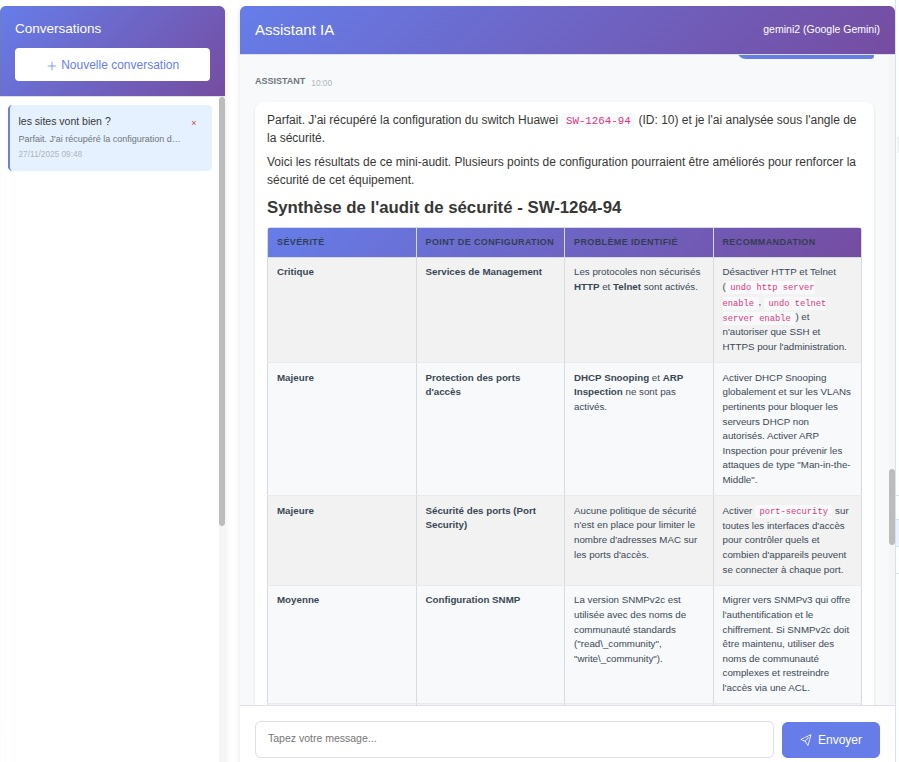
Audit report excerpt
Replace with SSH on SW-ACC-01, SW-ACC-04, FW-DMZ-01
Migrate to SNMPv3 with authentication
ACL defined but not applied to any interface
AI-assisted security audit
The AI analyzes the active configurations of your equipment and compares them to security best practices. Insecure protocols, default community strings, inconsistent ACLs, unjustified open ports: every weakness is identified, classified by severity and accompanied by a remediation recommendation.
The audit report is generated automatically and covers the entire monitored scope. No more manual device-by-device audits.
-
Insecure protocol identification
Telnet, SNMPv1, management HTTP: the AI detects risky protocols still active on your infrastructure.
-
Default credential verification
SNMP community "public", vendor default passwords, unchanged accounts: every default configuration is flagged.
-
ACL and filtering rule consistency
The AI verifies that ACLs are applied, consistent with each other and compliant with your security policy.
-
Structured report with remediation
Each finding is classified by severity (critical, major, minor) and accompanied by the corrective command adapted to the vendor.
Intelligent change planning
Describe the desired change in natural language and the AI generates a complete execution plan: commands adapted to each vendor, list of impacted devices, prerequisite verification and automatic rollback plan. All in seconds instead of hours of preparation.
It's not a generic command generator: it's a planner that knows your network.
-
Multi-vendor generation
Commands are generated in the exact syntax of each device. The same change produces different commands for Cisco IOS, Huawei VRP or Aruba AOS-CX.
-
Automatic impact analysis
Before any execution, the AI identifies impacted devices, affected services and potential risks.
-
Prepared rollback plan
For each generated command, the reverse command is prepared. In case of issues, rollback is immediate.
Planning process
Describe the change
E.g.: "Add VLAN 150 on the Paris site switches"
Review the generated plan
Commands, impacted devices, rollback
Validate and execute
Assisted execution with real-time monitoring
Ollama (On-premise)
100% local, zero outbound data. Total sovereignty over your network data.
OpenAI / Claude / Gemini (Cloud)
Maximum performance with latest generation models.
Interchangeable
Switch engines without modifying your workflows or habits.
Choose the AI engine that fits your constraints
Intelligent Networks doesn't lock you into a single vendor. You choose the AI engine that matches your performance, sovereignty and cost requirements. Switch from one engine to another without changing your workflow.
-
Data sovereignty
With Ollama, the AI runs entirely on your infrastructure. No network data leaves your servers. Ideal for sensitive and regulated environments.
-
Maximum performance
Cloud APIs (OpenAI, Anthropic Claude, Google Gemini, Ollama Cloud) offer the most advanced reasoning capabilities for complex diagnostics and large-scale analyses.
-
Total flexibility
Test different engines, compare results, switch providers if your constraints evolve. The interface and features remain identical.
The AI also knows your internal procedures
Add your own documents — operating procedures, standards, security policies, glossaries — to the knowledge base. The AI consults them on its own when a question relates to them, and takes them into account in its answers and action plans.
-
Categorized documents
Procedure, technical documentation, reference, security policy, glossary: the AI knows what type of document it is consulting.
-
Consulted on demand
Each document carries a description telling the AI when to open it — no useless noise in the context.
-
Permanent injection when you choose
Mark a document "always active" so it is taken into account on every generation, like an extension of the system prompt.
-
Isolated per company
Each company manages its own knowledge base — nothing is shared between tenants.
Knowledge base
Allowed command prefixes
show
display
ping
Any other command is refused and logged.
A powerful AI, under your guardrails
Giving an AI SSH access is not something you improvise. In Intelligent Networks, everything is closed by default: every authorization is explicit, granular and audited.
-
SSH disabled by default
The AI cannot run any command until you have authorized it, device by device.
-
Command whitelist
Only allow precise prefixes (show, display, ping…): any command outside the list is refused.
-
Tools deactivatable per company
Each of the 60+ internal tools can be switched off company by company — who disabled what, and when, is tracked.
-
Audited like a human
Every command run by the AI goes through the same log as human SSH sessions: session, command, output.
Why choose Intelligent Networks?
Comparison of network AI features
| Feature | Intelligent Networks | ChatGPT / Copilot | NMS Solutions |
|---|---|---|---|
| Automatic infrastructure context | Copy-paste | Partial | |
| Network command execution | |||
| Real-time data access | |||
| Configuration security audit | Generic | ||
| Change planning | No context | ||
| Multi-vendor commands | Generic | ||
| On-premise mode (Ollama) | |||
| AI engine choice | Single vendor | ||
| Additional cost | Included | Subscription | Paid option |
Concrete use cases
How Intelligent Networks AI assists your teams daily
Incident diagnostics
""Why does the SW-CORE-01 switch have CRC errors on Gi0/24?""
The AI analyzes metrics, checks interface logs and device configuration to suggest probable causes and specific corrective actions.
Inventory search
""List all devices with an IOS version below 15.2""
The AI queries the inventory, filters by your criteria and returns a structured table. No more scripts or manual exports.
Change planning
""Generate commands to add VLAN 150 on the Paris site switches""
The AI identifies affected devices, generates vendor-specific commands and prepares the rollback plan.
Security audit
""Analyze the core network configuration and identify vulnerabilities""
The AI produces a structured report with findings, severity levels and remediation recommendations tailored to each device.
Trend analysis
""Are there interfaces approaching saturation on the Lyon site?""
The AI cross-references monitoring metrics with defined thresholds to identify at-risk trends before they become incidents.
Automatic documentation
""Summarize configuration changes made on FW-PARIS-01 this week""
The AI compiles detected changes, presents them chronologically and generates documentation usable by the team.
Ready to give your network team an AI?
Diagnostics, security audit, planning and natural language analysis