Anticipate failures
before your users
Custom SNMP, SSH and Ping collection, intelligent multi-channel alerts. Detect weak signals and resolve problems before the incident.
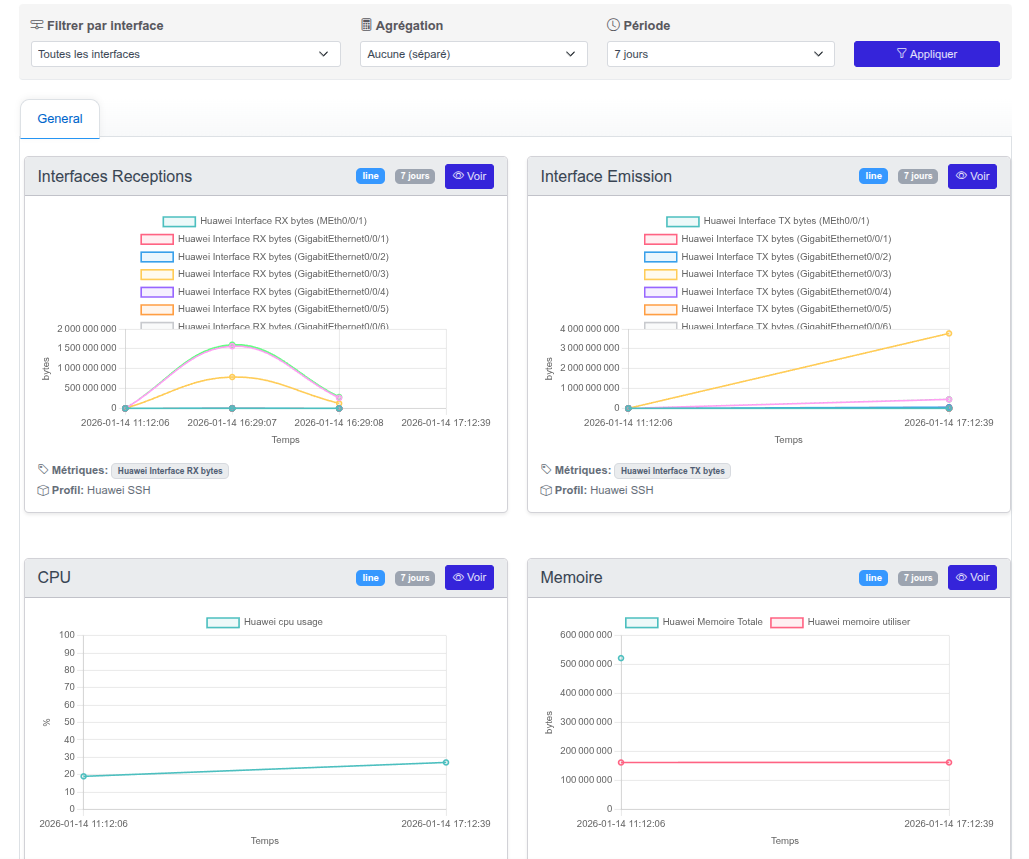
24/7 Monitoring
Continuous infrastructure monitoring
SNMP, SSH & Ping
Three collection modes for total visibility
Multi-channel alerts
Email, Teams, Slack, webhooks
Custom-built
Customizable dashboards and thresholds
The limits of traditional monitoring
Most network teams discover problems when users call. Traditional monitoring tools are often complex to configure, limited in collection capabilities and require multiple software to cover all needs.
-
Late alerts
You discover incidents when users call. Without well-configured thresholds, monitoring is passive: it observes instead of anticipating.
-
SNMP alone is not enough
Many critical data points (temperature, power supplies, proprietary metrics) are inaccessible via standard SNMP. You lose visibility.
-
Multiple fragmented tools
One tool for monitoring, another for graphs, a third for alerts. Information is scattered, diagnostics are slowed down.
-
Complex configuration
Zabbix templates, Nagios plugins, agents to deploy: hours of configuration for each new device before getting a single metric.
Sound familiar?
Intelligent Networks solves these.
All-in-one SNMP monitoring
Intelligent Networks natively integrates SNMP v2c and v3 collection to monitor all your network devices. CPU, memory, interfaces, traffic, latency: essential metrics are collected automatically and stored for historical analysis.
The integrated MIB explorer allows you to browse each device's SNMP tree, identify relevant OIDs and add them to monitoring in a few clicks, without editing configuration files.
- Native SNMP v2c and v3
- CPU, memory, interfaces, traffic
- Configurable collection intervals
- Long-term data history
- Trend analysis and capacity planning
- Common OIDs pre-referenced
Integrated MIB explorer
Browse the tree
Visually browse the device MIB tree
Identify OIDs
Filter by name, OID or description to find the metric
Add to monitoring
One click is enough to monitor the new indicator
SSH collection process
Define the command
E.g.: <code>show environment temperature</code>
Configure the regex
Extract the relevant value from the output
Periodic execution
Automatic collection and data storage
Customizable SSH collection
SNMP does not cover everything. Many devices expose critical data only through their command-line interface: component temperatures, power supply status, vendor-specific metrics. With Intelligent Networks SSH collection, anything accessible via command line becomes monitorable.
Anything accessible via command line becomes monitorable.
-
Free SSH commands
Execute any CLI command on your devices: show, display, get, proprietary vendor commands.
-
Regex extraction
Configure an extraction pattern to isolate exactly the value to monitor from the command output.
-
Reusable templates
Create metric templates and apply them to multiple devices in one click. Preconfigured templates available for common devices.
Customizable dashboards
Each user can build their own monitoring views. Whether you are a network technician, operations manager or CTO, you see the metrics that matter to you, organized according to your logic.
-
Varied chart types
Time-series curves, histograms, gauges: choose the representation best suited to each metric.
-
Flexible organization
Organize your dashboards by site, device type, criticality or business logic. Each view addresses a specific need.
-
Accessible from any browser
No thick client to install. Your dashboards are accessible from any workstation via web browser.
-
Fullscreen mode for NOC screens
Display your dashboards in fullscreen on control room screens for permanent visual monitoring.
View types
Curves
Time evolution
Histograms
Comparison
Gauges
Instant value
Fullscreen
NOC mode
Alert details sent directly to the relevant administrators
System alerts
Centralized console with complete history and resolution actions
Webhooks
Teams, Slack, ITSM ticketing or any compatible system integration
Multi-channel alert system
For each monitored metric, define warning and critical thresholds with appropriate trigger conditions. When a threshold is breached, the system simultaneously notifies via multiple channels to ensure the right people are reached.
-
Granular thresholds
Define warning and critical thresholds for each metric. Available operators: greater than, less than, equal, not equal.
-
Reusable profiles
Create threshold profiles and apply them to multiple devices. Override per device if needed.
-
3 simultaneous channels
Email, system alerts and webhooks run in parallel. Each channel is independently configurable.
-
Dedicated alert dashboard
View active alerts, browse history and track resolution actions from a centralized interface.
Availability, SLA and maintenance windows
Every state change is continuously logged: Intelligent Networks computes the real availability rate of each device and distinguishes suffered incidents from planned maintenance.
-
Uptime % per device
Over a sliding window: 24 hours, 7 days, 30 days or 90 days.
-
Outage timeline
Visualize every interruption: when, how long, and why (unreachable, critical threshold, failed collection…).
-
Aggregated view per site
Site ranking by reliability and list of recent incidents across your entire fleet.
-
Planned vs suffered downtime
Planned maintenance is not counted as an outage: your SLA reflects reality.
Maintenance windows
Schedule the intervention
Pick the device and the time slot: its status switches to "maintenance".
Notifications suspended
Alerts are still logged, but nobody gets notified during the window.
Automatic resumption
When the slot ends, notifications and SLA computation resume normally.
Ready-to-use metrics
Start monitoring immediately with preconfigured metrics for common devices
- CPU usage
- Memory usage
- Disk space
- Temperature
- Inbound / outbound bandwidth
- Errors and discards
- Interface status
- Packet counters
- Uptime
- Power supply status
- Fan status
- Firmware version
- Availability (up/down)
- Latency (ms)
- Packet loss (%)
- Status history
Why choose Intelligent Networks?
Network monitoring feature comparison
| Feature | Intelligent Networks | Zabbix / Nagios | PRTG / Datadog |
|---|---|---|---|
| SNMP v2c / v3 | |||
| Customizable SSH collection | Scripts | Limited | |
| Integrated MIB explorer | |||
| Customizable dashboards | |||
| Multi-channel alerts (Email, Webhooks) | Plugins | ||
| Preconfigured templates | Community | ||
| Long-term data history | Paid | ||
| NOC mode (fullscreen) | Grafana | ||
| Availability reports (SLA) | Limited | ||
| Configuration simplicity | Simple | Complex | Medium |
| Cost per sensor / device | No | Free | Yes |
Concrete use cases
How our clients use the Monitoring module daily
Proactive monitoring
Detect CPU and memory saturation before they impact users. Warning thresholds alert you in advance, giving you time to intervene before the problem becomes visible.
Proprietary metrics
Monitor vendor-specific data inaccessible via SNMP through SSH collection. Component temperatures, power supply status, proprietary counters: everything becomes visible and historized.
NOC screen
Display your dashboards on control room screens in fullscreen mode. Real-time infrastructure status view, automatic refresh, immediate anomaly identification.
Capacity planning
Analyze traffic and resource usage trends to anticipate bandwidth and capacity needs. Long-term history lets you plan infrastructure upgrades.
Incident management
Alert, Teams notification, diagnostics, resolution: all in one platform. Webhooks integrate with your ticketing tool to automatically create incidents and speed up processing.
Monthly reporting
Export performance data for client or management reports. Availability, usage trends, resolved incidents: all metrics are accessible and exportable.
Ready to anticipate instead of react?
SNMP and SSH monitoring, intelligent alerts and dashboards in one platform